Add a Dependency Safely
Start with the decision: will this package become part of your project, or will a named tool run once for inspection? The distinction is what you adopt, not whether code is downloaded. A temporary download can still execute third-party code and requires authorization.
The work, from your side
Purpose → decision → confirmation → verification
Dependency adoption requires review. A one-time inspection has a narrower, explicit contract. Neither route is a sandbox or a guarantee that a package is safe.
You define the purpose
Choose the right route
- What you get
- A named package and purpose, plus an explicit decision about adoption or one-time inspection.
- Before moving on
- A recurring script, CI integration or base-image change is not a one-time exception.
codeArbiter checks the request
Resolve policy and version
- What you get
- For adoption, package findings against project policy. For one-time use, a check of every eligibility condition.
- Before moving on
- Keep an unknown license, source or scope unresolved until evidence or an owner decision is available.
You authorize execution
Confirm the exact command
- What you get
- A pinned version, registry, command and intended output location presented before execution.
- Before moving on
- Review clearance is not permission to install silently. One-time permission does not authorize later adoption.
You inspect the result
Verify the actual changes
- What you get
- The installed version and reviewed diff, or an unchanged project plus a one-time command/output record.
- Before moving on
- Compare against the starting state. A report, approval or successful exit is not a merged PR.
Reading map, not a captured run or live status. Only the actual artifacts, approvals and fresh checks establish what has completed.
Choose adoption or one-time inspection
Section titled “Choose adoption or one-time inspection”| Your intent | Route | Before proceeding |
|---|---|---|
Add a package, adopt a tool in scripts or CI, or change a base image | Dependency review | Resolve policy and provenance, then confirm the exact install or change |
Run a specifically requested tool once for inspection, adopting nothing | The bounded one-time path below | Every eligibility condition must hold; confirm the exact command |
Update an existing dependency as part of a code change, or remove it | Describe the change in feature or fix | Preserve the manifest/lockfile relationship; dependency changes are reviewed in the PR lane |
Ask what a package does without obtaining or executing it | Ask a read-only question directly | No install or tool execution is implied |
A one-time run is not exempt merely because it uses npx, a temporary directory or a pinned
version. If eligibility is unclear, use full dependency review. Do not create an override to
make an investigation fit the exception.
Run the Command
Section titled “Run the Command”Enter the command in the coding host, not the native terminal. Claude Code uses /ca:add-dep,
Codex uses $ca-add-dep, and Pi uses /ca-add-dep. These are existing spellings, not a new command
or a claim that every host has identical enforcement capabilities.
For adoption, name the package, version and purpose. Replace both placeholders before submitting:
Illustrative request, not a captured review:/ca:add-dep <package>@<exact-version>Evaluate this package for parsing external input in this project.Use this repository's policy. Show findings and the exact install command.Wait for my confirmation before installing.Without a supplied version, the reviewer evaluates the latest available. Before approving an install, require the resolved version to be explicit and to match the review. An old documentation example is not a current version recommendation or a fresh vulnerability assessment.
First record git rev-parse --show-toplevel, git rev-parse HEAD and git status --short in a
native terminal. Confirm that your host is using the same checkout. Preserve pre-existing edits,
including staged changes. These read-only checks identify the starting state, not package safety.
What the Reviewer Checks
Section titled “What the Reviewer Checks”The read-only dependency-reviewer reads .codearbiter/security-controls.md and
.codearbiter/tech-stack.md. Its findings distinguish the package identity, policy, approved
source, maintenance signal, known advisories and supply-chain concerns such as install scripts.
The reviewer does not run install commands or edit the project.
A denied or undetermined license and an unapproved source block adoption. Maintenance concerns and HIGH advisories are surfaced for evaluation; a known CRITICAL advisory blocks without the required documented justification. An unresolved supply-chain or provenance concern cannot be silently treated as clearance. Inspect the actual findings, not just a final PASS label.
The Repository’s License Policy
Section titled “The Repository’s License Policy”Your project’s declared policy governs. Read both policy files; the reviewer charter gives an
allowed-license list in tech-stack.md precedence when one is enumerated there. If the files
contain incompatible requirements or a package’s license is unknown, obtain a project-owner
resolution rather than silently editing the policy or copying another repository’s exceptions.
A license identifier in an example is not a legal determination or an approval for your project.
The CVE Gate
Section titled “The CVE Gate”Use the audit command and threshold declared for the target project. Do not copy codeArbiter’s own npm audit settings into another stack. Record the actual result and any declared exclusions, such as omitted development dependencies. A filtered clean result does not establish that the entire dependency graph has no advisories, and an unavailable audit remains unverified.
One-time inspection: nothing adopted
Section titled “One-time inspection: nothing adopted”An ephemeral tool here means one named tool invocation for inspection or analysis, without adding it to the project’s dependency graph. All of these conditions must hold:
- You requested that specific tool by name in the current session.
- It runs once for inspection or analysis, not as a script, hook or CI integration.
- It changes no manifest, lockfile, base image or committed artifact.
The command still requires an exact version, the approved registry, and confirmation naming the
exact command before execution. Its npm one-time path specifies https://registry.npmjs.org;
it does not authorize git+, file: or non-TLS sources. A different registry requirement is a
reason to stop and resolve policy, not improvise an exception.
For a duplicate-code investigation, a request could be:
Illustrative request, not an executed tool run:For this investigation, use jscpd once to inspect duplicate code.Do not adopt it as a dependency or add it to scripts, hooks or CI.Propose an exact pinned command from the approved registry.Put its cache and any report outside the project in a system temporary directory.Show the command and output location, then wait for confirmation.Preserve every existing project change and verify what the run touched.This request does not supply a version or authorize immediate execution. Inspect the proposed pinned invocation before approving it. No package was downloaded or executed to produce this example, and no current safety or CVE verdict is implied.
Prefer a system temporary directory for cache and reports. That choice limits accidental repository residue; it does not isolate execution, block network access or prevent the tool from reading files available to its process. Confirm that the requested inspection is permitted for the repository’s data and environment. A tool that needs adoption to operate takes full review.
Verify a one-time run
Section titled “Verify a one-time run”Before execution, record the manifest and lockfile states, including staged and unstaged content, and the intended report location. Afterward, compare them with that baseline and inspect the rest of the working tree for newly created files or unintended artifact changes.
git status --porcelain over the relevant manifest and lockfile paths must remain unchanged.
Also compare their actual content: an already-dirty file can change again without changing its
status code. Use git diff and git diff --cached, with before/after content snapshots or hashes
for those paths when needed. Preserve existing changes rather than assuming a clean checkout.
Check the declared temporary output and account for new untracked or ignored report files;
ordinary status output alone does not show all ignored files.
The handoff should name the exact pinned command, its observed result, where its output went, and the before/after checks performed. A successful exit alone does not prove that nothing changed. If a manifest, lockfile or committed artifact changed, stop this path and inspect the diff. Review any proposed adoption before continuing; do not erase unrelated work to restore a clean-looking status. If the tool’s result is inconclusive, keep that uncertainty in the investigation record.
After Clearance
Section titled “After Clearance”For adoption, read the proposed install command and confirm it separately. After it runs, verify that the installed package and version match the review, inspect the manifest and lockfile diff together, and explain any transitive changes. Run the project’s audit and declared tests, lint and type checks. Unrelated packages or a substituted version require investigation rather than accepting the earlier clearance.
Commit the manifest and lockfile changes together through the normal delivery lane. Have PR review evaluate the exact current diff. See Review and ship a change for the distinct commit, PR, current-check and merge decisions. The dependency command does not promise its own fixed-path report or a typed acceptance receipt.
When the Review Fails
Section titled “When the Review Fails”For a denied license, unknown source or unresolved concern, choose an acceptable alternative or obtain the required project-owned decision before adoption. If a permitted installation fails, inspect its partial manifest/lockfile changes before retrying. Restore only changes attributable to that attempt after review; do not reset the repository or delete a lockfile as a generic fix.
This dependency gate is orchestrator-enforced, not hook-enforced. No pre-bash rule prevents a bare package-manager install outside this route. The H-07 manifest-change signal is an advisory, not a hook-level install block. The bounded one-time exception does not weaken a separate security control or permit bypassing an installation restriction in your environment.
When Not to Use This Command
Section titled “When Not to Use This Command”For a removal or an existing-version update within an application change, continue through
feature or fix with the dependency change stated explicitly. Asking a question requires no
deprecated btw entry. Making a one-time tool recurrent later is a new adoption decision,
not reuse of the earlier approval.
Implementation route and owning references
Follow the work, not a catalog
Review before adopting a dependency
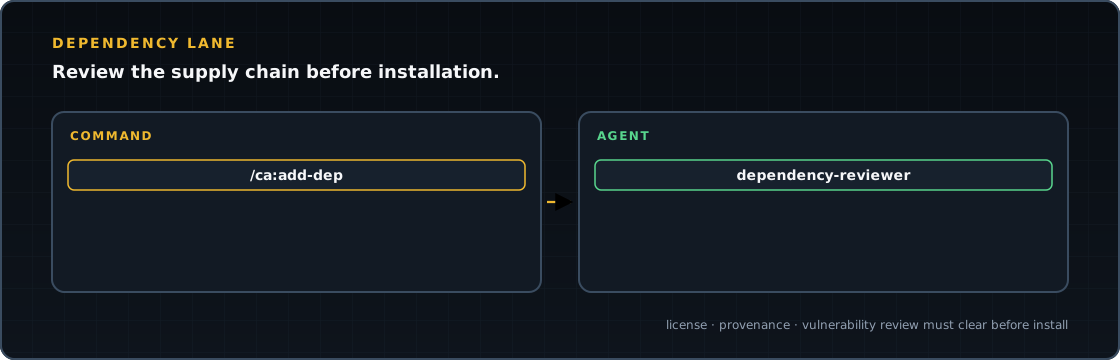
The adoption path is shown here. A one-time named inspection tool is a separate bounded branch inside the same command. The reviewer does not install the package.
Rows identify roles. Gold commands enter or define a procedure; blue skills coordinate work; green agents perform bounded roles. Arrows cross rows in execution order. A dashed arrow reuses a procedure rather than calling its entry again. Dashed nodes are conditional roles selected for the work.
Chapter 1 / 1
Review, confirm, then adopt
Who checks the package, and who is allowed to run the install?
Link to this chapter- command
/ca:add-dep: identify the package
Name the package and exact version. Read the project policy and stack requirements; an omitted version must be resolved before treating a review as specific.
Result: A concrete package and the policy it will be judged against.
review first → The command dispatches its dependency reviewer before any install.
Source for step 1 - agent
dependency-reviewer
Inspect license, registry, provenance, maintenance, audit findings and install-script posture. Return findings; do not install or modify files.
Result: A package-specific review result with unresolved concerns visible.
cleared package → Return a verdict before asking for the install action.
Source for step 2 - command
/ca:add-dep: installation confirmation
After the reviewer clears the package, the orchestrator presents the exact install command for your confirmation. A review pass is not that instruction.
Result: Explicit permission for the named installation.
confirmed command → Run only the confirmed adoption and inspect its resulting files.
Source for step 3 - command
/ca:add-dep: inspect the adoption
Check the actual manifest and lockfile changes. The command requires them to be committed together, never one without the other; use the existing delivery procedure.
Result: The paired dependency change and its delivery obligation.
Source for step 4
Before continuing: The reviewer verdict and install confirmation are separate. A denied license or unresolved provenance concern blocks adoption.
Continuations, returns and repeat paths
A reviewed and explicitly confirmed dependency change. Inspect the manifest and lockfile, then deliver them together through the owning change and commit/PR procedure.